Budget Balance Doesn't Match the Bank? Trace It to the Cent
Why a budget app balance drifts a few cents from the bank, often on foreign-currency charges, and how to find the exact rows by hand or with an AI agent.


Your budget balance doesn’t match bank records: the app says you owe S$1,283.70 on a card, the bank says S$1,284.17. It is 47 cents, so the tempting move is an adjustment and a shrug. But treat a gap that small as one specific row until proven otherwise, because that row tells you something, like which card adds a fee on foreign charges.
This guide shows why balances drift, how to find the rows by hand in any app, and how Open Net Worth, an open-source personal wealth agent, hunts the gap from a screenshot of your bank app.
Short answer: Treat the gap as rows, not noise. Compare the same balance on both sides (posted, not available), list the bank’s rows since the last date the two agreed, match them one by one, and add up what is left over. A few cents on a foreign charge means the app and the bank converted it at different rates. Only adjust for what you cannot trace.
Note: The card, rates and amounts in this post are an invented example, not anyone’s real account. The screenshot is from the public demo with amounts hidden.
How people hunt the gap today
On budgeting forums the same story comes up again and again. In one r/ynab thread, a user whose card was off by about $50 went line by line through roughly 100 transactions, found a $60 duplicate, and was still about $6 off. The replies split three ways:
- Adjust and move on. One reply put it plainly: “My time is worth more that 6$”.
- Reconcile more often. Another pushed back that “Reconciling does NOT = making an adjustment”, and that regular reconciling would have exposed the duplicate quickly.
- Check the start. If every row matches, others said, the starting balance is the likely culprit.
Spreadsheet trackers hit the same wall. In an r/personalfinance thread, one reply suggested checking the sheet’s balance against each PDF statement, so a miss is boxed into one month instead of years of history.
Foreign currency gets the least help. In an old r/ynab thread on foreign currency, one reply records each amount at the rate of the day, then reconciles at the current rate and logs the difference under a “Foreign Currency Fluctuation” category. That keeps the total right but doesn’t say which charge drifted or why.
YNAB’s own reconciling guide asks for a match “to the penny” and suggests reconciling spending accounts weekly. When the numbers disagree, its flow ends in Create Adjustment & Finish. Finding the row is up to you.
Why foreign-currency charges drift
Here is the example. Your card is billed in Singapore dollars. You pay a USD 40.00 subscription and log it the same day. The budget app converts it at its rate, say 1 USD = 1.2950 SGD, and books S$51.80. A few days later, the bank posts S$52.27.
Both numbers are “right” by their own rules. The bank converts when the charge settles, at the rate of that day, and may add a foreign transaction fee, sometimes folded into the amount and sometimes as its own row. Ramp’s explainer describes how a pending foreign charge is replaced days later by the settled amount.
Open Net Worth works the same way on its side. When you enter a USD amount against an SGD card, the ledger converts it into the card’s currency with its cached exchange rate (from Yahoo Finance) and keeps the USD 40.00 as the row’s Original charge. The docs on base currency and FX say the rate is the one when you saved the row, not on its date. Import a charge three weeks late and the gap can be larger.
Why an adjustment hides the real row
An adjustment is a plug: one transaction for whatever is left, so the balance agrees today. It won’t tell you which card charges a foreign fee or that a coffee was entered twice, and next month the same cause adds another plug. The skill below says it bluntly: “reconcile_accounts is a plug, not an explanation.” Trace first; adjust only for a residual you choose to accept.
Find the rows by hand, in any app
This works in YNAB, Actual Budget, a spreadsheet or Open Net Worth:
- Pin both numbers. Use the bank’s posted (current) balance, not the available one, and your app’s cleared balance. On a card, the bank shows what you owe as a positive number; your app may show it negative. A sign is not a gap.
- Find the last date they agreed. Your last reconcile, or the last statement where the closing balance matched.
- List the bank’s rows since then. Count them. If the counts differ, a row is missing or doubled.
- Sort both lists by amount and tick off pairs. Allow dates a few days apart.
- Add up what is left over. If it equals the gap, you are done looking.
| Date | Bank row (example) | Bank (S$) | App (S$) | Result |
|---|---|---|---|---|
| Oct 3 | Ride hailing | 14.20 | 14.20 | Match |
| Oct 6 | Supermarket | 86.35 | 86.35 | Match |
| Oct 9 | Subscription, USD 40.00 | 52.27 | 51.80 | Off by 0.47 |
| Oct 14 | Card payment | -500.00 | -500.00 | Match |
| Oct 15 | Cafe (pending) | 18.40 | 18.40 | Not in posted |
The pending cafe charge is uncleared in your app and still missing from the bank’s posted balance, so neither side counts it. That leaves one row, off by exactly S$0.47. Three patterns help when the leftovers are less obvious:
- Gap equals one amount: a missing or duplicated row.
- Gap is twice an amount: a row entered in the wrong direction.
- Gap on a foreign row: different rates or a fee. Fix the amount to what the bank posted.
How Lucius traces a gap from a screenshot
Open Net Worth ships a built-in skill for this, balance-mismatch-tracer, one of the skills of Lucius, the agent inside the app. Say “the app says 1,283.70 but my bank says 1,284.17” and Lucius loads it, or type /balance-mismatch-tracer. Our AI agent for personal finance guide explains skills. The playbook:
- Pin both numbers. He reads the account’s balance, asks which bank figure you mean and as of when, and works out the gap with a calculator tool.
- Get the bank’s side as rows. He asks once for a screenshot of your bank app’s transaction list back to the last date the two agreed, a statement file, or rows pasted in. With none, he looks for statements already uploaded before asking again.
- Match row by row. Each bank row is matched by amount and a date within a few days. He also checks the window for duplicates, since a duplicate is an “extra” row the bank never had.
- Explain the gap. He adds up the leftover rows and compares them with the gap. For a row whose amount differs, he reads its edit history first, so an accidental edit after import is named, with its date and amounts.
- Report, as a list of rows that adds up to the gap, plus anything still unexplained.
- Fix only what you approve, then re-read the balance and report the new gap.
The rules matter most. “A gap is rows until proven otherwise, cents included.” He may not call a difference rounding. “Timing” counts only when a pending row can be pointed to in the bank’s list. And without the bank’s side, there is no verdict, because the ledger always agrees with itself.
For our example, a report in the skill’s format would read:
**SGD card**: app S$1,283.70, bank S$1,284.17 (current balance, as of Oct 16) → gap S$0.47

Explained:
- Oct 9 · Subscription (USD 40.00) · S$52.27: amount differs by S$0.47 (S$51.80 in the app)

Unexplained: nothing

Fix: set this row's amount to S$52.27; the original charge stays USD 40.00
That is the skill’s report shape filled with invented numbers, not a recorded chat. Attach the screenshot with the paperclip (talking to Lucius). It goes to the AI provider you configured, so crop it to the transaction list; see where your financial data goes. A blurry or cropped image can drop a row, so check the list he reads back.
Step 6 is an instruction to the agent, not a lock. A new conversation starts in Auto, where ordinary changes happen straight away and the reply shows them. Pick Manual to approve every change.
Fix the row, then reconcile monthly
Fixing the example by hand takes one edit: open the transaction, change its SGD amount to S$52.27, and keep Original charge at USD 40.00. If the card’s currency differs from your base currency, the edit form also offers Value in your base currency, a value that stays as you entered it.
Then reconcile, so the next gap is small and recent. On the account, Reconcile asks “Is the real balance …?” using the cleared balance, the part your bank has posted. Yes, it matches marks it reconciled. No lets you type the real balance and books one adjustment for the difference.
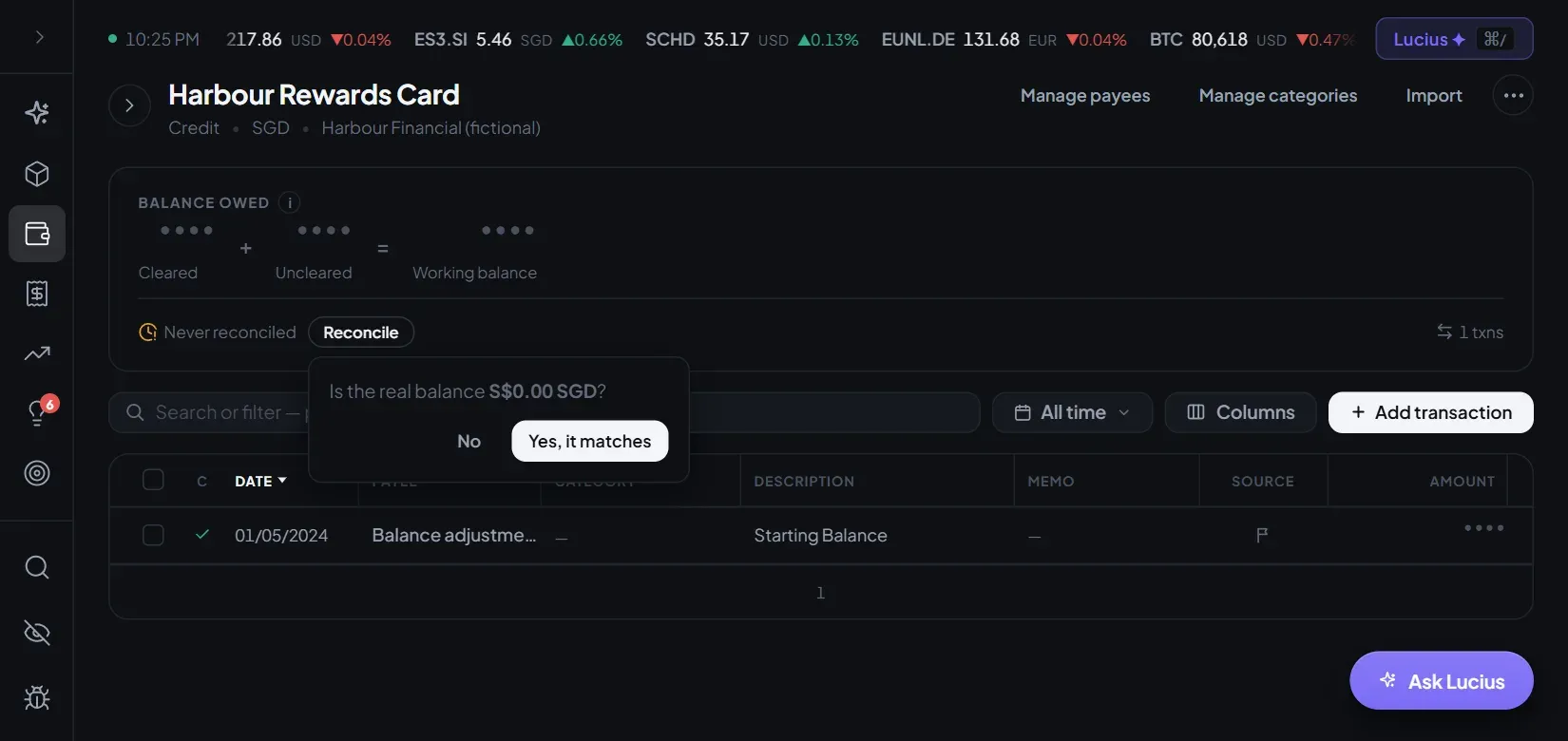
The accounts list says Needs reconciling once an account’s last reconcile is over 30 days old. Monthly is the floor the accounts docs suggest; for a busy card, weekly makes each hunt shorter.
If your bank gives you files, import them: the import checks each statement against the balances it prints (see importing bank statements). No bank sync? A budget app without bank sync covers the email-plus-statements routine, and SimpleFIN is the sync option for US and Canadian accounts.
When it’s not FX: duplicates, edits, a wrong opening
Not every gap is a currency story:
- Duplicates. A charge you typed by hand and then imported. Statement import links a statement row to the entry you already have instead of adding it twice.
- An edited row. A stray keystroke on an imported amount. The tracer reads the row’s history before blaming the import.
- A wrong opening balance. If the gap is the same at every statement close, no single row is wrong: the start is. The app’s statement drift check calls this
constant_drift, and the fix is the opening amount. - A row before the start date. Rows dated before the account’s opening date don’t count toward its balance.
Make reconciling a routine
A monthly close is a small habit: reconcile each account, trace anything off, then look at the budget. The personal finance workflow post lays out a full month. Coming from YNAB? See our YNAB comparison, or why people self-host personal finance; the self-hosting guide gets it running.
Frequently asked questions
Why is my budget app a few cents off from my bank?
Usually one row. The most common culprit is a foreign-currency charge: the app converted it at its own rate when you saved it, and the bank posted it later at its rate, plus any fee. A missed fee, interest or a small refund are the other usual suspects.
Should I just add a balance adjustment?
Only after you have looked for the row. An adjustment makes the numbers agree but explains nothing, and the same cause comes back next month. If you trace the gap and a small residual is left that you choose to accept, then an adjustment is a fair way to close it.
Which bank balance should I compare against?
The posted or current balance, not the available balance, because pending charges are not on your statement yet. Compare it with the cleared balance in your app. On a credit card, the bank shows what you owe as a positive number.
Is it safe to send a screenshot of my bank app to an AI?
The image goes to the AI provider you configured, like any other message. Crop it to the transaction list, hide the account number if you like, and keep the dates, descriptions and amounts. A local model keeps it on your machine.
Sources
- balance-mismatch-tracer skill (Open Net Worth source)official
- Foreign-currency conversion in ledger.py (Open Net Worth source)official
- Base currency and FX (Open Net Worth docs)official
- Accounts: Reconcile with your bank (Open Net Worth docs)official
- Skills (Open Net Worth docs)official
- Talking to Lucius (Open Net Worth docs)official
- Reconciling Accounts (YNAB Help)official
- Why do some international charges post days later at a different amount? (Ramp)
Keep reading

AI & Agents
Personal Finance MCP Server: Use Your Ledger from Claude
Connect Claude, ChatGPT, Cursor or VS Code to your self-hosted ledger through Open Net Worth's MCP server, and block the tools you don't want it to touch.
 9 min read

AI & Agents
Muse vs dots vs an Open-source Personal Wealth Agent
Meta's Muse and OpenAI's dots run in their makers' clouds and reach your money via apps. Where your data sits, who can move money, and what you can undo.
11 min read

AI & Agents
AI Agent for Personal Finance: A Personal Wealth Agent
An open-source personal wealth agent you run: an AI agent for personal finance that keeps one ledger and acts on it. What Lucius can and can't change.
7 min read